
ERP Software: Basic Knowledge and Concepts for Beginners
ERP software, or Enterprise Resource Planning software, is a business management system that integrates core functions such as finance, accounting, sales, purchasing, inventory, manufacturing, human resources, customer management, and other operations into a connected platform.
For beginners, understanding the basic concepts of ERP software is an important first step when researching business solutions, planning an ERP implementation, or considering a career in ERP. Modern businesses use ERP systems to connect departments, centralize business data, automate routine processes, and improve visibility across daily operations.
This guide explains what ERP software is, how it works, its key components, common modules, deployment types, benefits, implementation process, examples, and the basic knowledge required to understand ERP systems.
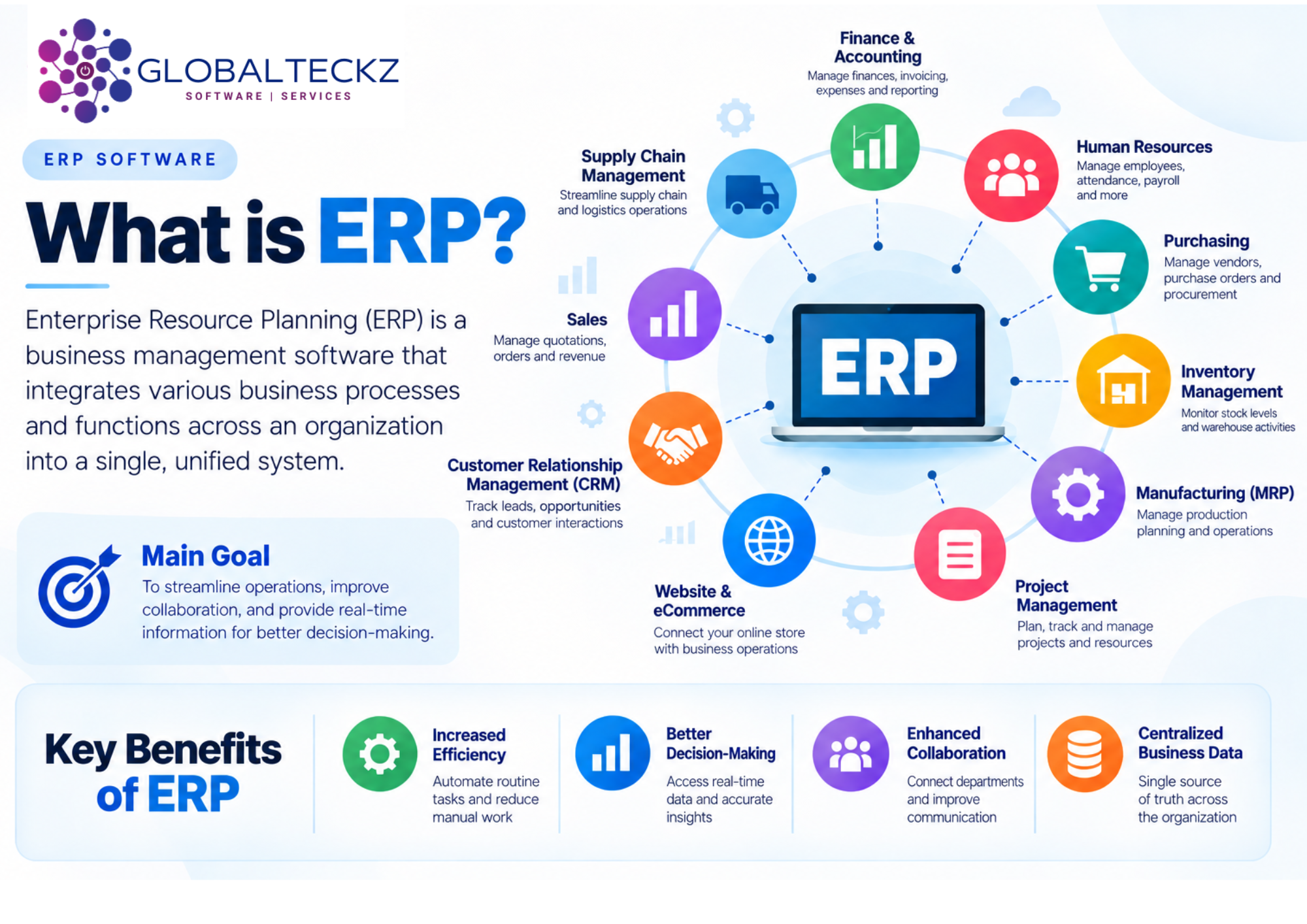
Understanding ERP software and its connected business functions
01 · ERP Fundamentals
What Is ERP Software?
Enterprise Resource Planning, commonly known as ERP, is a type of business software designed to connect and manage different organizational processes through a centralized system.
Instead of using separate software for accounting, inventory, sales, purchasing, human resources, manufacturing, and other functions, an ERP system allows these departments to work through connected applications and shared business information.
The main purpose of ERP software
The main purpose of ERP software is to create a continuous flow of information across an organization. When business processes operate through a common system, employees can access consistent information, reduce duplicate data entry, automate routine activities, and improve coordination between departments.
For example, when a customer places an order, the related information can flow through sales, inventory, delivery, purchasing, and accounting processes. This creates a connected workflow rather than requiring employees to manually transfer information between different systems.
02 · How ERP Works
How Does ERP Software Work?
ERP software works by connecting different business functions through a common platform and centralized database. Each department can use the applications relevant to its operations while information flows between related processes.
For example, when a sales order is confirmed, the system can update inventory information, create delivery activities, generate purchasing or manufacturing requirements when necessary, and provide the accounting team with information required for financial processing.
This connected approach allows organizations to manage business processes from a single environment rather than relying on multiple disconnected applications.
ERP systems can be deployed through cloud, on-premise, or hybrid environments depending on the organization's infrastructure, security requirements, business processes, and budget.
03 · Core Architecture
Key Components of ERP Software
ERP systems consist of several components that work together to manage business operations. Understanding these components is important for anyone beginning to learn about ERP.
ERP Modules
ERP software is generally organized into modules, with each module supporting a particular business function.
Centralized Database
Business information is stored in a connected environment so authorized users can access relevant data according to their roles and permissions.
Business Workflows
ERP connects individual activities into structured workflows that help standardize business processes.
User Interface
Employees interact with the system through dashboards, menus, permissions, and functions relevant to their roles.
Reporting & Analytics
Connected information allows organizations to generate reports and analyze operational and financial data.
Integrations
ERP systems can connect with payment gateways, websites, shipping platforms, banking services, APIs, and other external applications.
Common ERP modules include:
- Finance and Accounting
- Sales
- Customer Relationship Management
- Purchasing
- Inventory and Warehouse Management
- Manufacturing
- Human Resources
- Project Management
- Supply Chain Management
- eCommerce
- Website Management
- Reporting and Analytics
Business Workflows in ERP
ERP software connects individual activities into business workflows. These workflows help businesses standardize processes and reduce manual coordination between departments.
Purchase Request
→
Purchase Order
→
Goods Receipt
→
Vendor Bill
→
Payment
Lead
→
Quotation
→
Sales Order
→
Delivery
→
Invoice
→
Payment
Reporting and Analytics
ERP systems collect information from different departments, allowing businesses to generate reports and analyze operational data.
- Sales performance
- Inventory levels
- Purchasing
- Production
- Financial performance
- Customer activity
- Employee information
- Business expenses
These reports can help management understand business performance and make decisions based on available data.
ERP Integrations
ERP software can also integrate with external applications and services. Depending on the business, integrations may include:
- Payment gateways
- eCommerce platforms
- Shipping systems
- Banking services
- CRM applications
- Tax systems
- Communication tools
- Third-party APIs
- Business intelligence platforms
Integrations allow information to move between the ERP system and other business applications.
04 · Business Functions
Common ERP Software Modules
Different ERP platforms offer different modules, but most business management systems cover several common operational areas.
Finance & Accounting
Manage accounting operations, invoices, expenses, payments, taxes, financial reports, and other financial activities.
Sales
Manage quotations, sales orders, pricing, customer information, invoicing, and related sales processes.
CRM
Manage leads, opportunities, customer interactions, follow-ups, and sales pipelines.
Purchasing
Manage suppliers, purchase requests, purchase orders, vendor information, receipts, and supplier invoices.
Inventory & Warehouse
Monitor stock levels, warehouse movements, receipts, deliveries, transfers, and inventory activities.
Manufacturing
Support production planning, bills of materials, work orders, production activities, and material requirements.
Human Resources
Support employee records, recruitment, attendance, leave, payroll-related processes, and appraisals depending on the ERP platform.
Project Management
Organize projects, tasks, deadlines, timesheets, resources, and project-related activities.
Supply Chain
Connect purchasing, inventory, manufacturing, logistics, sales, and related supply chain activities.
eCommerce
Connect online stores with product information, inventory, orders, customers, payments, shipping, and accounting.
05 · Deployment Options
Types of ERP Software
ERP software can be classified according to how it is deployed and managed.
Cloud ERP
Cloud ERP is hosted by a service provider and accessed through the internet. The provider generally manages the infrastructure, system updates, and technical environment.
Cloud ERP can reduce the need for businesses to maintain their own server infrastructure and can make it easier for employees to access the system remotely.
On-Premise ERP
On-premise ERP is installed and operated on an organization's own infrastructure.
This approach can provide businesses with greater control over their infrastructure and data environment, but it may also require internal technical resources for maintenance, security, backups, and upgrades.
Hybrid ERP
Hybrid ERP combines cloud-based and on-premise components.
Businesses may use a hybrid approach when certain applications or data need to remain within their own infrastructure while other functions are delivered through cloud services.
Open-Source ERP
Open-source ERP software provides access to source code according to its applicable license. This can provide businesses and development teams with greater flexibility for customization and development.
The level of customization, available functionality, support, and licensing requirements varies between different open-source ERP platforms.
06 · Business Benefits
Benefits of ERP Software
ERP software can provide several operational benefits when it is properly selected, implemented, and adopted by an organization.
Centralized Business Data
ERP systems bring information from different departments into a connected environment. This can reduce the need to maintain separate records across multiple applications.
Process Automation
ERP software can automate repetitive business activities such as invoice generation, order processing, notifications, approvals, and other workflows.
Improved Operational Visibility
Connected business processes provide greater visibility into areas such as sales, inventory, purchasing, finance, and production.
Better Reporting
Since information from different departments can be connected, businesses can create reports using data from multiple operational areas.
Improved Collaboration
ERP systems help departments work with shared business information, which can improve coordination between teams.
Reduced Duplicate Data Entry
When connected processes share information, employees may not need to enter the same information repeatedly into different systems.
Scalability
An ERP system can provide a foundation for businesses as they add users, products, locations, departments, processes, or additional business functions.
07 · ERP Planning
Challenges of ERP Implementation
Although ERP software can provide significant benefits, implementation also involves challenges.
Implementation Cost and Time
ERP implementation requires investment in software, infrastructure where applicable, consulting, development, migration, testing, training, and ongoing support.
Overall cost and timeline depend on organization size, users, modules, customization, integrations, migration, and project complexity.
Data Migration
Businesses often need to transfer data from existing software or legacy systems into the new ERP environment.
Data needs to be reviewed, cleaned, mapped, migrated, and validated before the system goes live.
Customization
Businesses may have processes that are not fully supported by standard functionality.
Excessive customization can make future maintenance and upgrades more complicated.
Change Management
Employees need to understand and adopt new workflows when an ERP system is introduced.
Training, communication, testing, documentation, and user involvement can help employees transition to the new system.
Integration
Businesses may need to connect their ERP system with existing applications, websites, payment systems, marketplaces, shipping services, or other external platforms.
08 · ERP Architecture
ERP Software vs Separate Business Applications
Before ERP systems became widely adopted, many organizations managed different departments using separate applications.
A typical disconnected setup might include:
- One application for accounting
- Another for inventory
- Another for sales
- Another for CRM
- Another for HR
- Spreadsheets for reporting
This approach can create disconnected information and require employees to transfer data between systems.
ERP software takes a different approach by connecting multiple business functions through a common platform.
For example, a sales order can be connected to inventory, delivery, invoicing, accounting, and customer information within the same business environment.
The objective is not simply to replace every existing application, but to create a more connected way of managing business processes.
09 · ERP Project Lifecycle
ERP Implementation Process
Implementing ERP software involves more than installing the software. A structured implementation process usually includes several stages.
01
Business Requirements Analysis
The first step is understanding the organization's existing processes, challenges, departments, users, and business objectives.
02
ERP Software Selection
Businesses evaluate ERP platforms based on functionality, industry requirements, scalability, integrations, deployment options, customization, support, and overall cost.
03
Process Mapping
Existing workflows are documented and reviewed to identify gaps, inefficiencies, and opportunities for improvement.
04
System Configuration
The ERP system is configured according to the organization's requirements, including users, permissions, workflows, accounting settings, products, warehouses, and other operational parameters.
05
Customization
If standard functionality cannot meet a specific requirement, custom development may be considered.
06
Data Migration
Relevant information from existing systems is prepared and transferred into the new environment.
07
Integration
Required third-party systems and applications are connected to the ERP platform.
08
Testing
The system is tested to verify workflows, integrations, reports, data, permissions, and other important functions.
09
User Training
Employees are trained on the functions and workflows relevant to their roles.
10
Go-Live
Once testing and training are completed, the system is deployed for actual business operations.
11
Post-Implementation Support
After go-live, businesses may require troubleshooting, optimization, training, development, upgrades, and ongoing technical support.
10 · ERP Platforms
Examples of ERP Software
There are many ERP platforms available for businesses, ranging from open-source and modular solutions to large enterprise platforms.
Odoo
A modular business management platform with applications covering areas such as CRM, sales, accounting, inventory, manufacturing, website, and eCommerce.
SAP
Enterprise business software covering a broad range of organizational processes and industries.
Oracle
Enterprise business applications supporting financial, operational, and organizational processes.
Microsoft Dynamics
Business applications designed to support finance, operations, sales, customer management, and other organizational functions.
ERPNext
An open-source ERP platform covering several business functions through an integrated system.
Choosing an ERP platform
Each platform differs in its modules, deployment options, customization capabilities, integrations, pricing structure, licensing model, and target market.
When evaluating ERP software, businesses should focus on how well the platform supports their actual processes rather than selecting a system based only on the number of available features.
11 · ERP Selection
How to Choose ERP Software
Selecting the right ERP software requires an understanding of both current business requirements and future objectives.
Business Size
Consider employees, users, departments, locations, and transactions the system needs to support.
Industry Requirements
Manufacturing, trading, healthcare, construction, retail, eCommerce, and professional services may require different functionality.
Required Modules
Identify the business functions that need to be managed through the ERP system.
Deployment Model
Evaluate whether cloud, on-premise, or hybrid deployment is appropriate for your organization.
Customization
Determine whether the platform supports your processes through standard configuration and where development may be required.
Integrations
Identify external systems that need to exchange information with the ERP platform.
Data Migration
Consider the amount and quality of information that needs to be transferred from existing systems.
Reporting
Evaluate whether the platform provides the reports, dashboards, and analytics required by management.
Scalability
Consider future users, locations, products, departments, and evolving business processes.
Implementation & Support
Evaluate implementation methodology, training, technical support, maintenance, upgrades, and long-term service.
Total Cost of Ownership
Consider implementation, customization, integrations, migration, training, infrastructure, maintenance, upgrades, and support in addition to software costs.
12 · ERP vs CRM
ERP vs CRM: What Is the Difference?
ERP and CRM are related business technologies, but they serve different primary purposes.
| ERP | CRM |
|---|---|
| Focuses on broader business operations such as finance, accounting, inventory, purchasing, manufacturing, HR, and supply chain. | Primarily focuses on customer-facing activities such as leads, opportunities, sales pipelines, customer interactions, and relationships. |
| Connects multiple internal business processes. | Primarily manages customer and sales processes. |
| Can include CRM functionality. | Can integrate with ERP systems. |
Many modern ERP platforms include CRM functionality, allowing customer-related processes to connect with sales, inventory, accounting, and other business operations.
For example, when a lead becomes a customer and places an order, an integrated system can connect the customer record with sales, inventory, delivery, invoicing, and accounting activities.
13 · Beginner Learning Path
How to Learn ERP Software: A Beginner's Guide
If you are new to ERP, learning both the technical and functional sides can provide a stronger foundation.
Step 01
ERP Fundamentals
Step 02
Business Processes
Step 03
ERP Modules
Step 04
Hands-On Practice
Step 05
Technical Concepts
Step 06
Documentation
Step 07
Real Projects
Step 08
Certifications
Start With ERP Fundamentals
First understand basic concepts such as ERP, modules, database, business workflows, users and permissions, configuration, customization, integration, data migration, and reporting.
Understand Business Processes
ERP software is built around real business processes. Learn how organizations manage sales, purchasing, inventory, accounting, manufacturing, human resources, customer management, and supply chains.
Learn ERP Modules
Once you understand business processes, study how different ERP modules support those processes.
For example, learn how a sales order connects with inventory and accounting or how purchasing connects with inventory and vendor bills.
Get Hands-On Experience
Practical experience is one of the most effective ways to understand ERP software.
Sales
→
Order
→
Delivery
→
Invoice
→
Payment
Purchase
→
Receipt
→
Vendor Bill
→
Payment
Hands-on practice helps connect theoretical concepts with actual business processes.
Learn Technical Concepts
- Databases
- APIs
- Web technologies
- Programming
- Data migration
- System integrations
- Security
- ERP customization
- Deployment
- Version upgrades
Explore Documentation and Training
Official documentation, training materials, technical guides, online courses, communities, and tutorials can help you develop ERP knowledge.
Study Real ERP Projects
Case studies and implementation examples can help you understand how ERP projects work in real organizations.
- Business requirements
- Process mapping
- Module selection
- Customization
- Data migration
- Integration
- Testing
- Training
- Go-live
- Support
Consider Certifications
ERP certifications can help validate knowledge for specific platforms or functional and technical roles. The appropriate certification depends on the ERP platform and career path.
Stay Updated
ERP platforms continue to evolve with new functionality, integrations, security improvements, deployment models, and technologies.
Continue learning about new releases, business practices, automation, analytics, integrations, and ERP trends.
14 · ERP Careers
Technical vs Functional ERP Knowledge
ERP careers generally involve both technical and functional areas.
Functional ERP Knowledge
Functional professionals focus on business processes and how the ERP system should be configured to support them.
- Business analysis
- Requirements gathering
- Process mapping
- ERP configuration
- User training
- Testing
- Documentation
- Industry knowledge
Technical ERP Knowledge
Technical professionals focus more on development, integrations, databases, customization, and system infrastructure.
- Programming
- APIs
- Database management
- Custom development
- Third-party integrations
- Data migration
- Testing
- Deployment
- Troubleshooting
Why both areas matter
Understanding both sides can be valuable because successful ERP projects require business requirements and technical implementation to work together.
15 · ERP for Growing Businesses
Is ERP Software Suitable for Small Businesses?
ERP software is not limited to large enterprises. Small and growing businesses can also use ERP systems to manage multiple business functions through a connected platform.
However, the appropriate solution depends on the organization's size, processes, budget, number of users, required modules, and future growth plans.
A smaller business may begin with essential functions such as accounting, sales, purchasing, inventory, and CRM, and add additional capabilities as its requirements develop.
16 · ERP Trends
What Is the Future of ERP Software?
ERP software continues to evolve as businesses adopt cloud computing, automation, artificial intelligence, analytics, mobile access, and connected business applications.
Cloud Computing
Cloud-based systems are changing how businesses deploy and access business applications.
Automation
ERP platforms increasingly automate repetitive activities and business workflows.
Artificial Intelligence
AI is becoming increasingly connected with business data, automation, analytics, and decision-support workflows.
Analytics
Businesses increasingly rely on connected data and reporting to understand operational performance.
Modern ERP platforms are increasingly focused on automating repetitive activities, improving real-time visibility, connecting third-party systems, and helping employees work with business data more efficiently.
The future of ERP will continue to involve greater integration between business processes, data, automation, analytics, and emerging technologies.
17 · Frequently Asked Questions
ERP Software FAQs
Find answers to common questions about ERP software, its functionality, implementation, benefits, and deployment.
What is ERP software?
ERP software is a business management system that connects different organizational functions such as finance, sales, purchasing, inventory, manufacturing, HR, and customer management through a centralized platform.
What is ERP software used for?
ERP software is used to manage and connect business processes, centralize information, automate workflows, generate reports, and improve coordination between departments.
What are the main ERP modules?
Common ERP modules include accounting, finance, sales, CRM, purchasing, inventory, manufacturing, human resources, project management, supply chain, eCommerce, and reporting.
How does ERP software work?
ERP software connects different business functions through shared data and workflows. Information generated in one process can be used by other connected departments.
What are the benefits of ERP software?
Common benefits include centralized data, process automation, improved visibility, better reporting, reduced duplicate data entry, improved collaboration, and scalability.
What are the different types of ERP software?
The main deployment types include cloud ERP, on-premise ERP, and hybrid ERP. Open-source ERP is another category based on software licensing and source-code availability.
Is ERP software suitable for small businesses?
Yes. Small businesses can use ERP software when the system matches their business requirements, budget, processes, and growth plans.
How long does ERP implementation take?
The implementation timeline varies depending on the number of users, modules, data migration requirements, integrations, customization, testing, training, and overall project complexity.
What is the difference between ERP and CRM?
ERP manages broader business operations, while CRM primarily focuses on customer relationships, leads, opportunities, and sales processes. Some ERP platforms include CRM functionality.
Is ERP software available in the cloud?
Yes. Many ERP platforms are available through cloud deployment, while some can also be deployed on-premise or through a hybrid model.
Conclusion: Understanding ERP Software
Understanding the basic concepts of ERP software is the first step toward evaluating how an integrated business management system can support an organization. ERP connects business functions, centralizes information, automates workflows, and provides greater visibility across business operations.
For beginners, the most important concepts to understand are ERP modules, databases, business processes, deployment models, integrations, implementation, customization, and ongoing support. Once these fundamentals are clear, it becomes easier to evaluate different ERP platforms and understand how they can be configured around specific business requirements.
ERP is not simply a piece of software installed within an organization. It is a system for connecting business processes, information, people, and workflows. A successful ERP project therefore depends not only on the software itself but also on proper planning, implementation, user adoption, data management, and ongoing optimization.



