
Odoo ERP Software for Smarter Business Management
Bring your business operations together with Odoo ERP software. Manage sales, CRM, accounting, inventory, purchasing, manufacturing, and other essential workflows through an integrated business management platform.
Globalteckz helps businesses plan, implement, customize, integrate, and migrate Odoo ERP according to their operational requirements.
Odoo consultation, implementation, customization, integration, and migration services.
What Is Odoo ERP Software?
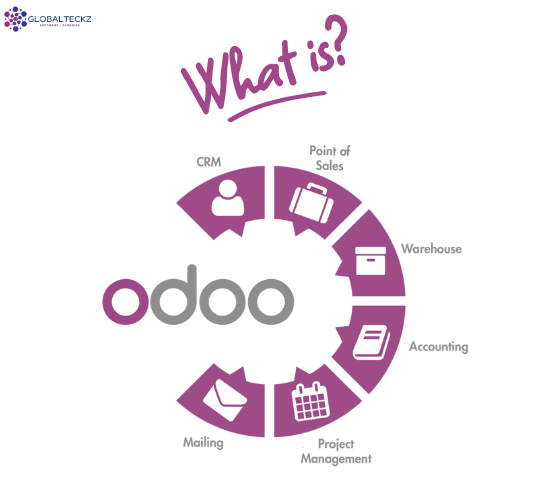
Odoo ERP software is a business management platform that connects different departments through a suite of integrated applications. Instead of maintaining disconnected systems for sales, purchasing, inventory, accounting, and manufacturing, businesses can configure Odoo to manage many of these processes within one environment.
Odoo offers applications for customer relationship management, sales, finance, inventory, human resources, manufacturing, eCommerce, point of sale, and other business functions. The applications a company uses depend on its requirements, selected edition, configuration, and deployment.
For example, a confirmed sales order can initiate inventory checks, delivery activities, and invoicing workflows when the appropriate products, routes, and settings are configured.
How Odoo Connects Your Business
- Centralize information across departments.
- Connect customer orders with inventory and delivery.
- Coordinate purchasing and stock replenishment.
- Link operational transactions with accounting workflows.
- Configure automation for supported business processes.
- Extend functionality through suitable modules and integrations.
Explore Odoo ERP Modules
Choose the Odoo applications that match your business workflows. Modules can be configured and connected according to your operational requirements.
Odoo CRM
Manage leads, opportunities, customer interactions, sales activities, and pipeline visibility from one place.
Explore CRM →Odoo Sales
Organize quotations, sales orders, customer pricing, and connected fulfilment workflows.
Explore Sales Module →Odoo Inventory
Manage stock movements, warehouse operations, replenishment, receipts, and deliveries.
Explore Odoo ERP Module →Odoo Accounting
Support invoicing, customer and supplier transactions, reconciliation, and financial reporting based on configuration and localization.
Explore Odoo ERP applications →Odoo Manufacturing
Manage bills of materials, manufacturing orders, work centres, and production workflows.
Explore Manufacruturing Module →Odoo Purchase
Coordinate supplier information, purchase orders, replenishment, and incoming stock.
Explore Purchase Management →Odoo Human Resources
Support employee administration, recruitment, leave, attendance, and other available HR workflows.
Explore Odoo ERP applications →Odoo eCommerce
Manage online product catalogues, customer orders, and connected inventory and sales workflows.
Explore Odoo ERP applications →Odoo Point of Sale
Support retail or hospitality transactions and connect supported POS workflows with inventory and other business operations.
Explore Odoo ERP applications →Application availability and features depend on the Odoo version, edition, hosting arrangement, installed applications, and configuration.
Why Businesses Choose Odoo ERP
Disconnected business applications can make it harder to maintain consistent data, coordinate departments, and monitor operations. An appropriately configured ERP system can help connect workflows and provide better visibility across the organization.
- Centralized business information and reporting.
- Connected sales, purchasing, stock, and accounting workflows.
- Reduced repetitive data entry where automation is appropriate.
- Improved visibility into orders, inventory, and business activities.
- Configurable applications to support different business processes.
- Integration options for compatible external applications.
- Implementation that can be planned around business priorities.
The actual benefits depend on business processes, data quality, implementation decisions, user adoption, and ongoing system management.
Is Odoo Right for Your Business?
Odoo may be suitable for businesses that want to connect multiple operational functions and reduce dependence on disconnected tools.
Before selecting an ERP system, evaluate:
- Your current business processes and operational gaps.
- The modules and reports your teams need.
- Required integrations and customizations.
- Data migration and historical record requirements.
- User training, implementation costs, and future support.
Odoo ERP Software for Different Industries
Odoo can be configured to support different operating models. The right setup depends on your processes, reporting needs, integrations, and industry-specific requirements.
Manufacturing
Connect production planning, bills of materials, manufacturing orders, component availability, and inventory workflows.
Trading and Distribution
Coordinate sales, purchase orders, stock availability, warehouse activities, and deliveries.
Retail and eCommerce
Connect product information, online orders, stock levels, point of sale, and fulfilment processes.
Wholesale Businesses
Manage customer pricing, quotations, bulk orders, supplier transactions, and stock replenishment.
Professional Services
Organize customer relationships, project activities, timesheets, invoicing, and service delivery where applicable.
Multi-Department Businesses
Connect operational activities and reporting across teams, locations, or companies where supported by the chosen setup.
Odoo ERP Implementation and Development Services
Globalteckz works with businesses to assess their requirements and plan Odoo implementation, development, integration, and support according to the agreed project scope.
Odoo Consultation
Review business processes, identify functional requirements, and define implementation priorities before development begins.
Odoo ERP Implementation
Configure the selected applications, business workflows, access permissions, and operational settings.
Explore implementation services →Odoo Customization
Extend standard functionality when your requirements cannot be met through configuration alone.
Explore customization services →Odoo Module Development
Develop additional modules and business-specific functionality based on documented requirements.
Explore module development →Odoo Migration and Upgrade
Assess source data, custom modules, integrations, and compatibility requirements before planning a migration.
Odoo Integration and Support
Connect compatible external applications and arrange ongoing assistance based on the required support scope.
Our Odoo ERP Implementation Process
A clear implementation plan helps businesses understand the project scope, prepare their data, and organize user adoption.
Requirement Analysis
Understand current workflows, business challenges, reporting needs, and required applications.
Planning and Configuration
Define the project scope, configure standard features, and identify any integration or customization requirements.
Data and Testing
Prepare migration data, test business workflows, validate results, and resolve issues before launch.
Deployment and Support
Prepare users, launch the agreed solution, and provide post-implementation support according to the project plan.
Implementation timelines and costs vary according to the number of applications, complexity of business processes, data migration, integrations, customization, and user requirements.
Odoo Community vs Enterprise and Deployment Options
Odoo editions and deployment options address different needs. The right choice depends on required functionality, technical flexibility, hosting preferences, and budget.
| Option | What to Consider | Suitable Evaluation Criteria |
|---|---|---|
| Odoo Community | Open-source edition with functionality determined by the relevant release and available modules. | Required features, technical resources, maintenance, and module compatibility. |
| Odoo Enterprise | Licensed edition with additional applications and features according to the applicable subscription. | Business requirements, licensing, support needs, and required applications. |
| Odoo Online | Odoo-hosted SaaS deployment with platform-specific customization limitations. | Preference for managed hosting and reliance on standard supported functionality. |
| Odoo.sh | Managed platform for development and deployment of supported Odoo projects, including custom code. | Development workflows, staging, custom modules, and deployment management. |
| On-Premise | Self-hosted deployment where the organization manages or arranges infrastructure and technical operations. | Infrastructure control, security requirements, technical expertise, and maintenance responsibilities. |
Confirm current licensing, hosting capabilities, version compatibility, and available features with the official Odoo documentation before selecting a deployment option.
Odoo ERP Version Upgrades and Migration
Businesses using an older Odoo release may consider upgrading to access newer functionality, maintain a suitable technical environment, or support changing operational needs.
A successful migration requires more than transferring the database. Existing custom modules, third-party integrations, reports, business workflows, and historical records must be assessed before the target version is selected.
- Review the existing Odoo version and database.
- Identify custom modules and third-party integrations.
- Assess data quality and migration requirements.
- Test critical workflows in the target environment.
- Plan user validation, deployment, and post-migration support.
Moving from Legacy ERP Software?
If your business currently uses spreadsheets, a legacy ERP, or separate applications, begin by documenting the processes and data that need to move into Odoo.
A migration assessment can help identify integration dependencies, customization requirements, and potential implementation risks before the project begins.
Discuss Your MigrationWhy Work with Globalteckz for Odoo ERP?
Established in 2013, Globalteckz provides business software and ERP-related services to organizations seeking solutions aligned with their operational requirements.
Our approach focuses on understanding the business process first, identifying the required Odoo applications, and determining where standard configuration, integration, or custom development may be needed.
- Requirement-led project planning.
- Odoo implementation and configuration.
- Customization and module development.
- Integration and migration planning.
- Training and post-implementation support options.
- Phase-wise deployment where appropriate for the project.
Discuss your project scope, timeline, budget, and technical requirements with our team to determine the next steps.
Looking for Odoo ERP Software for Your Business?
Tell us about your business operations, required modules, existing software, and project goals. Globalteckz can help you evaluate the next steps for an Odoo ERP implementation or upgrade.
Email: sales@globalteckz.com
Odoo ERP Software FAQs
Find answers to common questions about Odoo ERP applications, implementation, customization, migration, and costs.
What is Odoo ERP software used for?
Odoo ERP software helps businesses manage connected operations such as CRM, sales, purchasing, inventory, accounting, manufacturing, HR, and eCommerce through integrated applications. The modules selected depend on business needs and the chosen configuration.
Is Odoo ERP suitable for small and medium-sized businesses?
Odoo may suit small and medium-sized businesses that want to organize multiple business functions in one platform. The right setup depends on the required applications, budget, internal resources, and operational complexity.
Which modules are available in Odoo ERP?
Odoo provides applications for CRM, Sales, Purchase, Inventory, Accounting, Manufacturing, Human Resources, eCommerce, Point of Sale, and other business functions. Availability and functionality depend on the version, edition, and configuration.
Can Odoo ERP be customized?
Yes. Odoo supports configuration and, where the deployment permits it, custom modules and development. Customization requirements should be documented and tested for compatibility, maintainability, and future upgrades.
Can Odoo integrate with an existing eCommerce website?
Odoo can be connected to compatible eCommerce platforms and external applications through supported connectors, APIs, or custom integration. The available approach depends on the source platform, required data flows, and technical requirements.
How much does Odoo ERP implementation cost?
The cost depends on licensing, hosting, selected applications, number of users, data migration, customization, integrations, training, and support requirements. A project assessment helps establish a more accurate estimate.
How long does Odoo ERP implementation take?
Implementation time varies with project scope, process complexity, data readiness, integrations, customization, and testing. A smaller standard implementation may require substantially less time than a complex multi-department deployment.
Can I migrate from an older ERP system to Odoo?
Migration may be possible after reviewing the source system, data structure, customizations, and required integrations. A migration plan should include data validation, workflow testing, user acceptance, and a deployment strategy.
What is the difference between Odoo Community and Enterprise?
Community and Enterprise are different Odoo editions with differences in available features and services. Compare the current official feature lists and licensing conditions against your business requirements before selecting an edition.
How can I get started with Globalteckz?
Contact Globalteckz at sales@globalteckz.com or use our enquiry form. Share your business requirements, current software, preferred modules, and expected project scope so the next steps can be discussed.
Odoo Implementation and Development Resources
Explore related Globalteckz services to understand implementation, customization, and module development options.

Version Odoo 18
Odoo 18 introduced improvements that help businesses automate routine processes, simplify configuration, and adapt the ERP system to their operational requirements. Its updated applications and enhanced user experience make this release a significant choice for businesses looking to modernize their existing ERP environment.

Last Version Odoo 19
Odoo 19 focused on helping businesses improve operational efficiency through enhanced automation, streamlined workflows, improved analytics, and a more refined user interface. These enhancements make the release a practical option for businesses looking to modernize their ERP processes, improve productivity, and manage operations more effectively.

New Version 20
Odoo 20 is the latest major release of the ERP platform, introducing new capabilities and enhancements across business applications, automation, user experience, and operational workflows. The release continues the platform's focus on helping businesses streamline processes, improve productivity, and manage their operations through an integrated ERP environment.
Community EditionFree Version
Online EditionStandard Cloud
Odoo Online is a SaaS (Software-as-a-Service) cloud-hosted solution managed entirely by the provider. It includes all Enterprise features, automatic upgrades, and zero technical maintenance. Best suited for small to medium-sized businesses, it offers limited customization flexibility and does not provide access to server files or support custom modules.
Odoo.SHShared Hosting
On-PremisesOn your Own Server
Odoo On-Premise Edition allows businesses to host the ERP system on their own servers or preferred cloud platforms. It supports both Community and Enterprise versions while offering full control, extensive customization, and scalability, making it suitable for organizations with in-house IT teams or strict data security requirements.


Discuss
We discuss your project and goals you would like to achieve.
Design
Based on Discussion. We provide you with base design.

Develop
After design is approved. Customization & Development work start.
Deliver
We go live once the development is completed. Offering Further Support.







ManufacturingVerticals
Trading Businesses
E-CommerceIntegrations
CustomizedOdoo